
Chats: The Class Manager Feature That Saves Business Owners Time, Energy and Money
•
3 min read

How often does your phone go off and your stomach drop? Wondering if that's a disgruntled parent contacting you, or a friend messaging you?
If you're running your own dance studio, gymnastics studio, or other class-based business, you shouldn't be having those dilemmas, mostly because the days of handing out your personal WhatsApp are a thing of the past with Class Manager's new communication feature, Chats.
The Problem Chat’s Here To Solve?
Class Manager created Chats because it saw the need for it in the class-based business world. Noticing that studio owners shared the same problems:
The feeling of not wanting to check your phone, because you know there's probably a student, parent, or coach in your WhatsApp or DMs waiting for a response from you. But there's also the question of how reachable you are. Parents shouldn't be able to contact you at 11pm on a Sunday, or expect a response from you when they do.
The real cost of communication chaos. It's not just annoying, it's expensive. Every minute you spend hunting through WhatsApp for a parent's message about a costume payment is a minute you're not teaching, choreographing, or actually running your business.
And if you're paying for a separate messaging tool on top of your class management software, that's real money leaving your bank account every month for something that should just be built in. That's where Chats comes in.
What Is Chats in Class Manager?
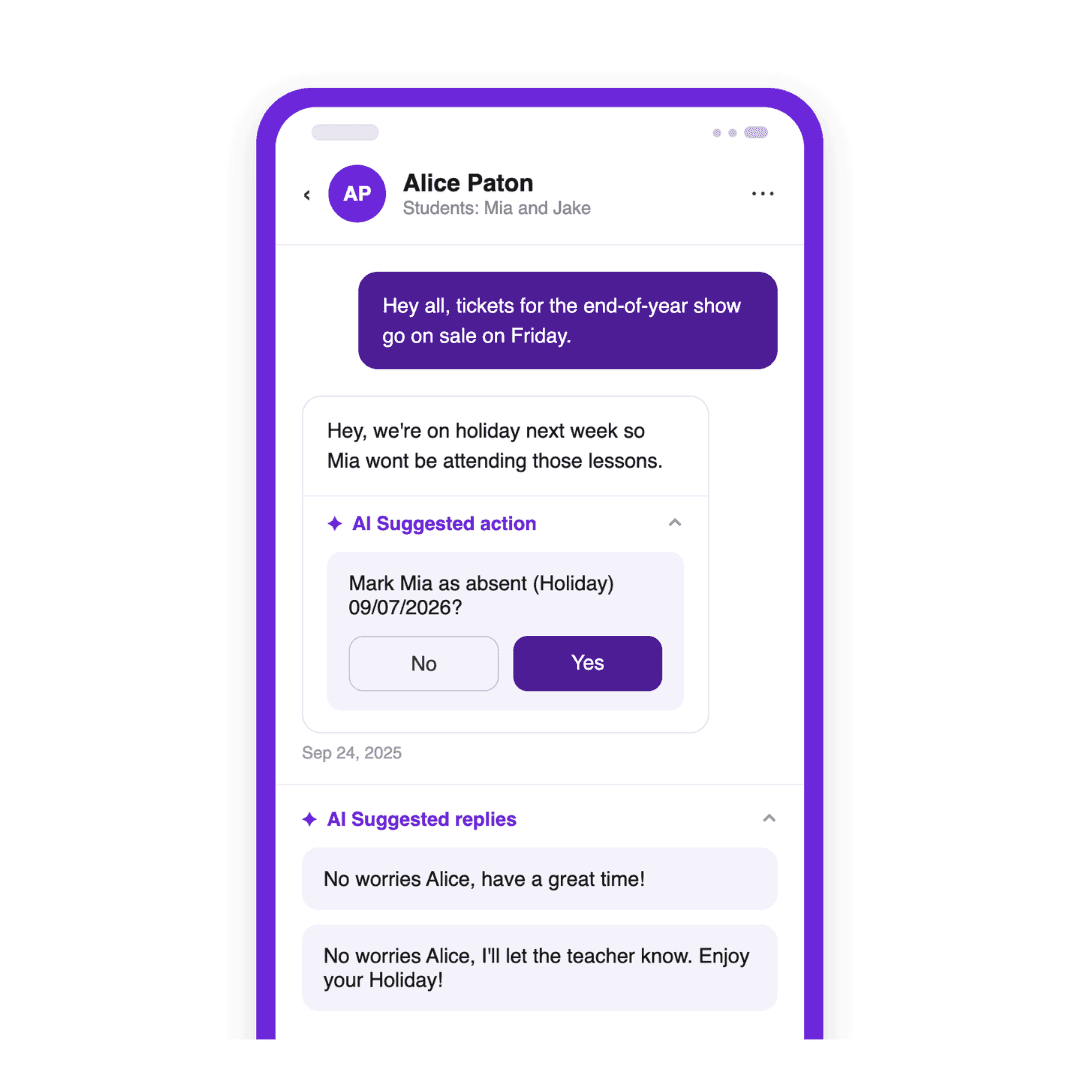
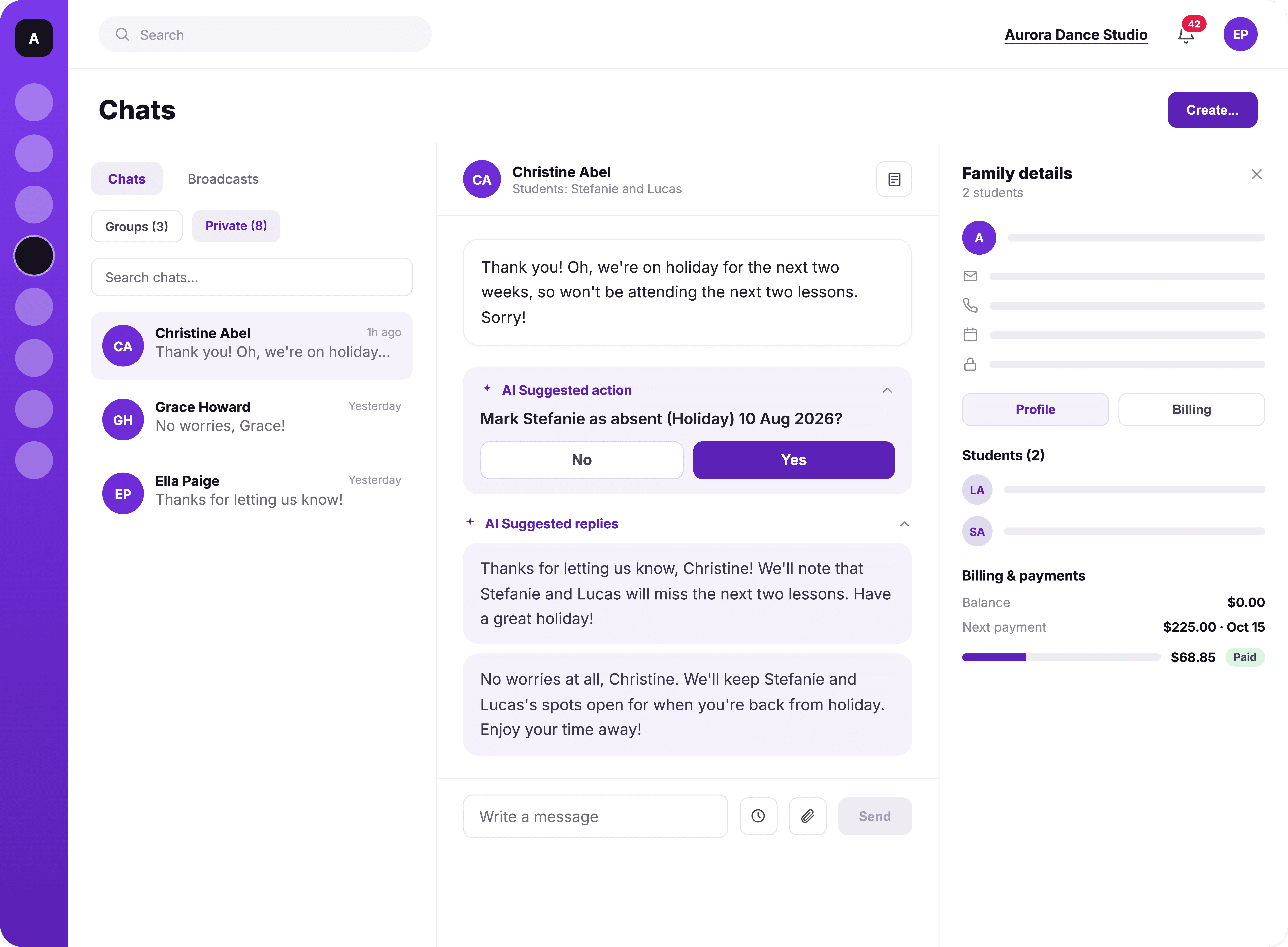
Chats unifies every family conversation inside Class Manager, with AI-powered suggestions, family previews, broadcast and group messaging, and reactions. It replaces scattered WhatsApp threads with clear, private, trackable communication for studios and families alike.
No more chasing messages across WhatsApp, texts, and email. Everything lives in one place, and AI suggests replies and actions so your responses take seconds, not minutes.
Here's what's included:
Broadcast Messages: Reach multiple families instantly, filtered by lesson, class, or season. Every recipient gets a private, personal message. No group chat, just clear comms.
One-to-One Messaging: Have direct conversations with individual families, started by either side, all inside Class Manager.
Push Notifications: You and your families get alerted the moment a new message arrives.
Group Chats: Create group chats and stay in full control of who's in them and what gets shared.
React with Emojis: Respond quickly without breaking the flow of conversation. A thumbs-up or a heart says plenty.
AI Suggestions and Replies: Never stare at a blank reply box again. Chats suggest replies and actions for you, so you can respond to parents and clear tasks in seconds, not minutes. (Perfect for those situations where the same question pops up constantly)
Family Preview: See the breakdown of family details all on one page. The sidebar shows enrolled classes and any balance owed, next to every 1:1 chat.
One Place for Everything: Benefits for Studios and Families
The biggest win with Chats is simple: everyone stops having to check five different places to stay in the loop.
For studio owners, that means:
Send broadcast messages to targeted groups in seconds
Manage every conversation in one place, no more switching between WhatsApp, email, texts, and your CRM
Keep your personal phone number private
Skip the cost of a separate messaging or CRM tool just to stay organised with parents
For families, that means:
Get timely updates without checking five different apps, one place to see everything
A simple, familiar messaging experience, so replying is easy
Available in their Class Manager family portal
If you're a studio owner spending even 30 minutes a day jumping between apps to answer parent questions, that's over three and a half hours a week gone. Chats gets that time back, for you and for the families.
Safeguarding: Keeping Children's Communication Where It Belongs
Communication about children shouldn't be scattered across apps that were never designed for a studio setting. This is where Chats does some of its most important work.
Because everything happens inside Class Manager, conversations about your students stay contained to the people who should actually be seeing them: studio owners and staff. Nothing about a child is sitting in a WhatsApp group that could be screenshotted, forwarded, or left visible on someone's personal phone. Nothing is floating around in the public domain, on a Facebook group, or in a messaging app your studio has no control over.
That's a much safer setup than trusting a patchwork of personal messaging apps to keep sensitive information private.

Boundaries and Safeguarding: Why Personal Numbers Should Stay Personal
One of the quieter benefits of Chats is what it does for your teachers, and for your students.
When staff messages families through their own personal number, two things happen.
First, they lose the boundary between work and home life. A parent can message an instructor at 9pm about a missed class, and that instructor either has to reply from the sofa or feel guilty for ignoring it. Chats fixes that.
Second, and just as important, handing out personal numbers creates a real risk for your business. If a teacher leaves and goes on to open their own studio, or start freelance classes, they walk away with a phone full of direct contacts for your families.
Keeping all communication inside Class Manager removes that risk. Families are connected to your studio, not to an individual teacher's personal mobile. If a staff member moves on, their access goes with them, but your relationship with your families stays exactly where it should: with your studio.
Chats in Class Manager Is More Than Just Chats
Chats brings every family conversation into one place, backed by AI that helps you reply faster and a family preview that gives you the full picture at a glance. It keeps children's information contained to the people who should see it, and it protects your team's boundaries while protecting your studio's future.
Want to find out more about Chats? Book a demo with our team, who can take you through it all. Or, create your free account. Or, see our team take you through it in more detail here.

