

If you've ever tried to coordinate teachers, rooms, and equipment across a packed weekly schedule, you know the struggle is real. Dance studios, gymnastics clubs, martial arts centers, and swim schools all face the same headache: scheduling classes while managing shared spaces, preventing age group conflicts, and keeping parents in the loop.
Picture this: you've got eight-year-olds accidentally booked into a 9PM Tuesday slot (way too late!), two teachers assigned to the same room at the same time, and students enrolled in both gymnastics tumble and barre at overlapping times. Sound familiar? What if you could easily see your timetable and spot errors before they even go live? Introducing class management software with class scheduling capabilities, built in and designed for you.
But, with so many options on the market, what are the top-class management platforms for scheduling? Let's break it down.
How We Chose the Best Class Management Platforms
Not all platforms are created equal. Here's what we looked at when picking our top three.
Visual scheduling and calendar views - Can you see your entire week at a glance with color coding for different class types, teachers, and rooms? Effective class scheduling software detects scheduling conflicts automatically, and that's a must-have.
Student enrollment and parent portal - Can parents enroll online, view upcoming classes, and manage their own registrations? Attendance tracking is essential for managing student participation in classes, so we checked for that too.
Equipment and space management - It helps allocate venues, resources, and time slots for classes. For studios sharing rooms, mats, courts, or tumble equipment, this matters a lot.
Cost structure - Is the free plan genuinely free, or are there hidden fees? We favored platforms with no monthly subscription over those with heavy restrictions.
Ease of use - How fast is the setup process? Can parents figure it out without a manual? Features like waitlists help fill openings when students cancel, and class scheduling software can manage both physical and virtual classes, so we checked for those too.
Top 5 Class Management Platforms for Scheduling
1. Class Manager
Class Manager is a fully cloud-based class scheduling software. It's designed to handle everything from scheduling and enrollment to billing and parent communication-all without a monthly subscription.
Why It Stands Out
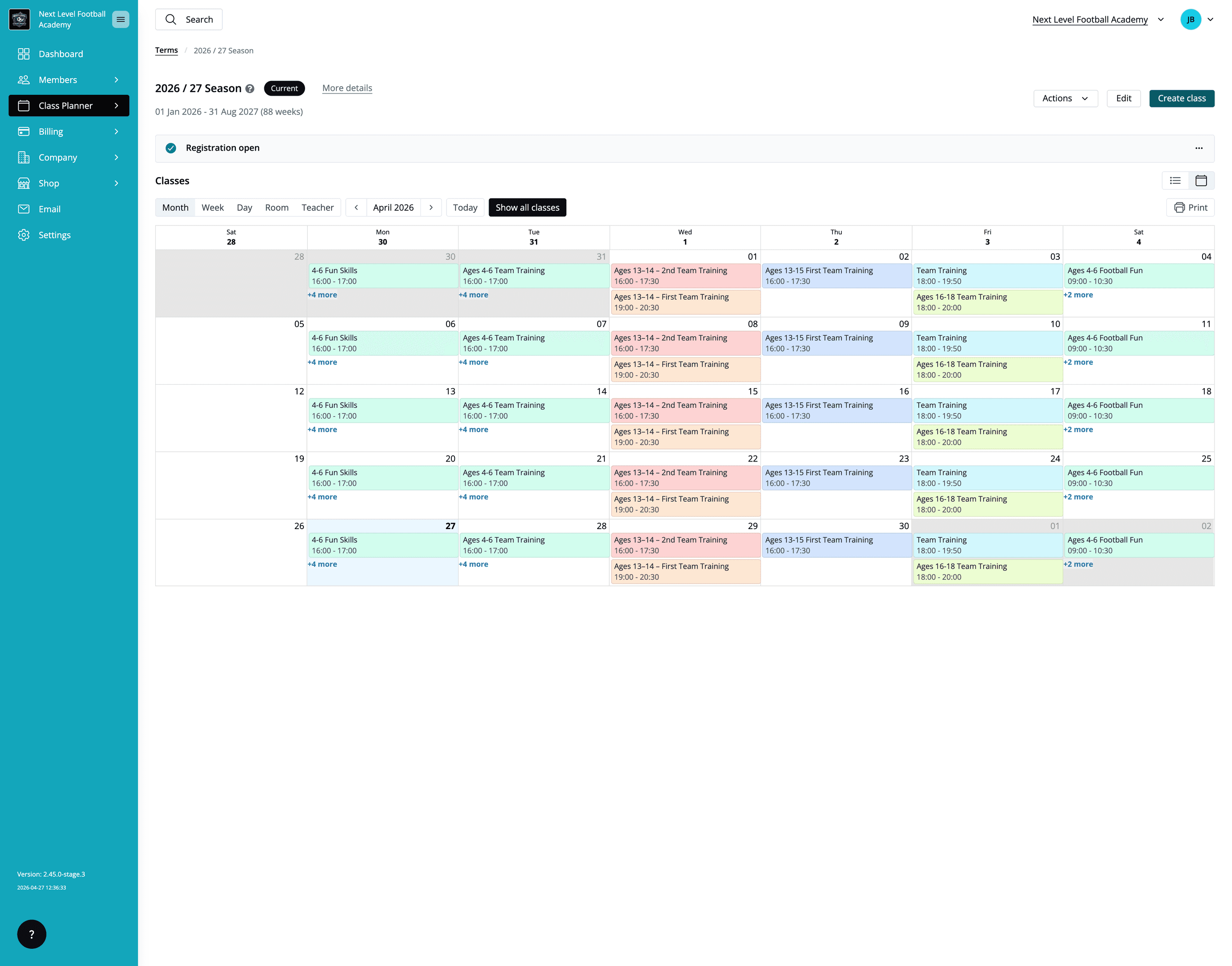
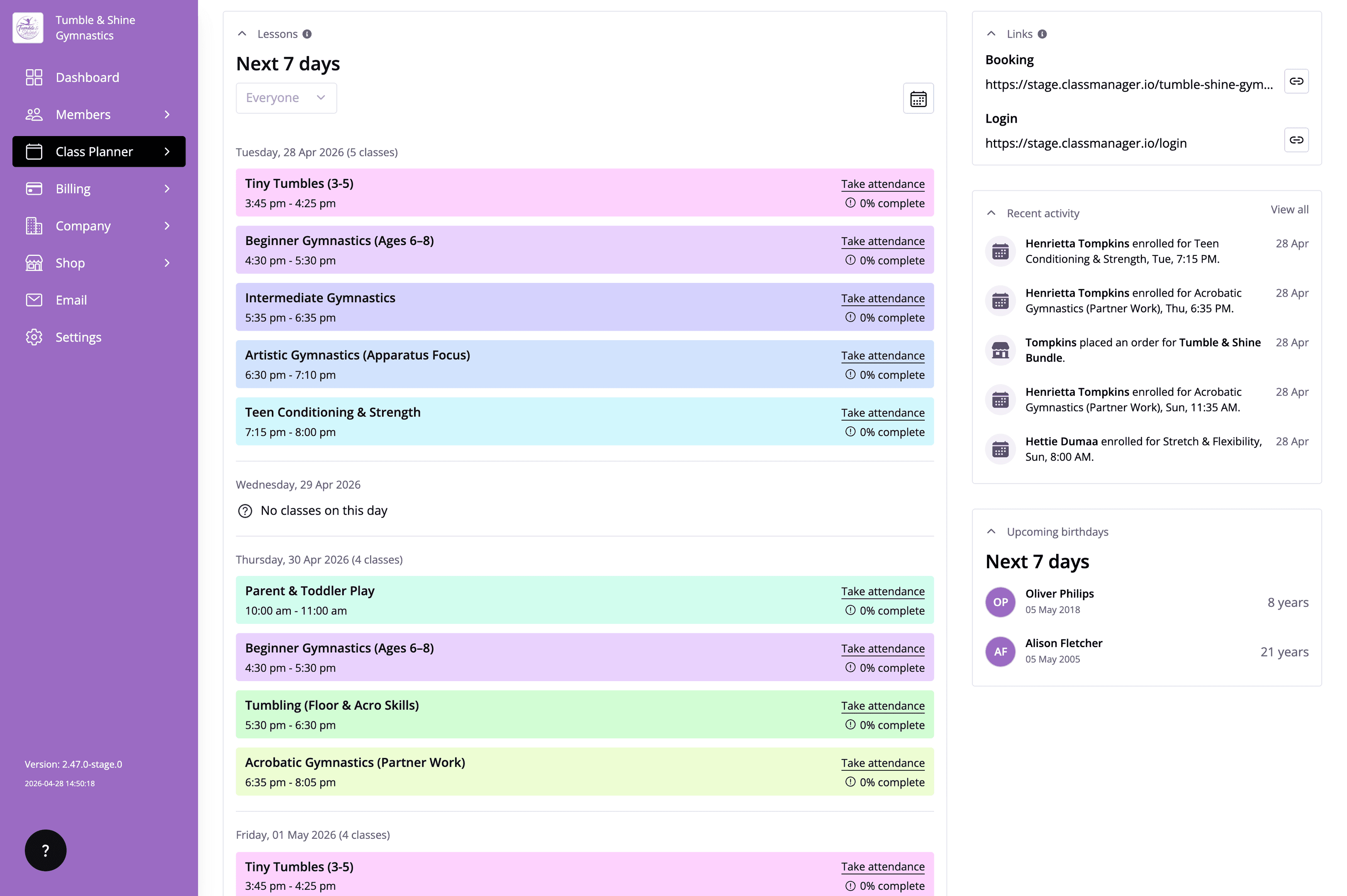
With Class Manager, you can view your schedule as individual lessons each week or in a full calendar view, with color-coded classes that make it easy to see what's happening at a glance.
But here's the real magic: You get conflict alerts when you accidentally schedule two classes with the same teacher or room at the same time. No more double booking nightmares!
The parent portal lets families enroll students, view class details, and manage their own registrations. Communication tools streamline parent-student interactions in class management, meaning you spend less time answering the same questions over and over. Students can book classes online through the scheduling software, and class registration forms can be customized for different classes.
Best For
Small to medium dance studios, gymnastics clubs, martial arts centers, and swim schools seeking a comprehensive free solution that doesn't cut corners.
Key Strengths
No monthly subscription fees-completely free platform (with standard payment processing fees if you use online payments)
Advanced visual scheduling with color-coded classes and multiple view options
Automated alerts prevent scheduling conflicts for teachers and rooms
A parent portal allows clients to manage registration and communications
Dance studios benefit from automated billing and enrollment processes-automated billing reduces administrative burden for class management
Possible Limitations
Focused primarily on performing arts and related activities, so if you're running a purely fitness-based business, some specific features may not apply
May require initial setup time for complex scheduling needs, especially if you're managing multiple locations or very large staff schedules
That said, for studios looking to plan a new season's schedule, Class Manager makes the whole process remarkably smooth.
2. Jackrabbit
Jackrabbit is one of the longer-standing names in studio management software. It's been around for years and has built a reputation in the industry. However, when it comes to free access, the picture is a bit different.
Why It Stands Out
Jackrabbit has strong industry recognition and offers a range of features for studios willing to pay. Their platform covers class scheduling, billing, and student management, but the free offering is primarily a trial rather than a permanent free plan.
Best For
Studios willing to pay for premium features after a trial period.
Key Strengths
Basic scheduling capabilities available during the free trial
Integration with billing systems for handling payments
Automated reminders help decrease no-shows in classes
Possible Limitations
Limited free features, mainly trial-based, with no permanent free option
The interface can feel complex, requiring significant training to get comfortable
Lacks the visual calendar flexibility and color coding of newer platforms like Class Manager
Advanced features such as real-time updates and conflict detection may require paid tiers
3. Dance Studio Pro
Dance Studio Pro is a traditional studio management software that's been serving the dance community for a long time. It takes a more desktop-oriented approach to class scheduling and management.
Why It Stands Out
Its longstanding presence in the dance studio market means it has a loyal user base. Class scheduling software can manage student databases effectively, and Dance Studio Pro does offer basic tools for that.
Best For
Studios are comfortable with older-style software interfaces and are less reliant on cloud-based access or mobile functionality.
Key Strengths
Basic class scheduling functionality and class description management
Some reporting features are included for tracking staff performance and enrollment
Desktop-based reliability for studios that prefer local software
Possible Limitations
Limited visual scheduling options-no vibrant color-coded calendar views
No mobile parent portal, which means parents can't easily book appointments or check schedules on the go
Outdated interface compared to modern cloud solutions
Minimal conflict detection features-you'll need to manually check for double booking
If you're weighing up what really matters in class management software, modern platforms tend to offer a much smoother booking experience for both studio owners and parents.
4. Google Calendar (Free)
Let's be honest, plenty of studio owners have tried using Google Calendar to manage their schedule. It's free, familiar, and available on every device. But is it really enough?
Why It Stands Out
It's completely free and widely accessible. Calendar syncing works across devices, and most people already know how to use it.
Best For
Very small studios or individual instructors with simple scheduling needs and no requirement for student management or enrollment.
Key Strengths
Free and familiar to most users
Color coding capabilities for different appointment types
Multiple calendar sharing so staff members can see each other's availability
Works across all devices during business hours and beyond
Possible Limitations
No student enrollment management or intake forms
No automated conflict detection-if you accidentally schedule two classes in one room, Google won't warn you
No parent portal or communication tools
Lacks studio-specific features like attendance tracking, billing, or waitlists
Can't track class registrations, handle payments, or manage equipment
While free class management software can automate scheduling and reminders, Google Calendar simply can't do that at the level studios need. Studio owners on Reddit have reported spending hours manually checking for conflicts when using generic calendar tools-a problem that dedicated appointment scheduling software eliminates instantly.
5. Acuity Scheduling (Limited Free)
Acuity Scheduling (now part of Squarespace) is a popular appointment scheduling platform used across many industries, including fitness businesses. It's primarily designed for one-on-one appointment booking rather than group class management.
Why It Stands Out
Simple appointment-based scheduling with a clean online booking interface. Clients book through a straightforward booking page, and the setup process is quick.
Best For
Individual instructors with minimal class management needs-think private lessons or one-on-one coaching sessions.
Key Strengths
Easy online booking interface where customers can book appointments quickly
Basic calendar integration and automated confirmations
Simple setup process with booking rules for availability
Automated follow-ups encourage repeat business after appointments
Possible Limitations
Very limited free features-more advanced features require a paid plan
Not designed for managing group classes, new class creation, or recurring schedules
No parent portal or student tracking
Lacks equipment and room management for different locations
No built-in tools for managing class-specific needs like age groups or skill levels
For studios that need to manage new bookings for group classes rather than just individual appointment scheduling, a dedicated platform like Class Manager is a much better fit.
Which Platform Is Best for You?
Choose Class Manager if you need comprehensive free club management software with visual scheduling, a parent portal, automated reminders, and zero subscription fees. It's the best class scheduling software option for studios that want everything in one place without paying a monthly fee.
Choose Jackrabbit Dance if you plan to upgrade to paid features eventually and want established dance industry software with a track record. Just know that the free access is temporary.
Choose Google Calendar if you have very simple scheduling needs, one location, and minimal student management requirements. It's a starting point, not a long-term solution.
Choose Dance Studio Pro if you prefer traditional desktop software over cloud-based solutions and don't need mobile access or a parent portal.
For class registration across dance, gymnastics, swim, and martial arts, a dedicated platform will always outperform generic business tools.

Final Thoughts
True "free forever" options are rare in specialized studio management software, but they do exist. Class Manager stands out as the best completely free option with professional-grade features, from visual scheduling and conflict detection to parent portals and automated billing.
While basic calendar tools and generic appointment booking software can get you started, studio-specific features make dedicated platforms worthwhile. The difference between manually checking for room conflicts and having your software alert you automatically? That's hours of your life back every single week.
Want to learn more about the software? Book a demo with our team, who can take you through it all. Or, create your free account here. Or learn more about Class Manager and how it can help you in our recent blog posts.
Why Class Manager Is the Best Option for Your Management Software?
Parent Portal: The Modern Resolution For Class Bookings & Parent Communication
What a Centralised Communication System Looks Like In Class Management Software
Why Class Manager Is The Best Class Management Software For New Class-based Businesses?

