

Class Manager is a fantastic choice of dance studio software for new, startup, or existing and established dance studios.
Not only is it an easy-to-use software available on a range of devices- phones, tablets, and laptops- it’s also a cost-effective choice for studios, with its no-monthly-subscription model. That means that you can get the software all set up and ready to take payments without paying a cent.
Other things that we have built into Class Manager, making it the perfect choice for a start-up dance studio, include:
It’s Easy To Set Up Your Class Manager Account
Starting your own business is hard enough, without having to spend hours learning and setting up over-complicated software. This is why we’ve designed Class Manager to be intuitive to use. Everything from setting up your class schedule to adding in discounts, packages, multiple teachers, and sessions can be done in just a few clicks.
Plus, we have a host of resources to help you get the most out of your Class Manager software: helpful guides, a human customer support team available 6 days a week, and a dedicated account manager who will be on hand to help you throughout the setup process.
Or, if you need your account populated with your schedule, teachers, and students quickly, we offer an onboarding service where we set up everything you need for you.
Enrolments, Easy As 5,6,7,8
When setting up your own business, enrolment is incredibly important. It needs to be easy, seamless, and professional. Class Manager handles it all for you in various ways:
Family Portal: New and existing students can create their own family portal account; from there, they can easily book onto classes, purchase merchandise from your shop, and communicate with your studio, all via their phone, without having to go back and forth with your studio. Saving both you and your families time.
Trials: Set up drop-in classes and free or paid trials. This is particularly useful when you’re just starting and want to encourage new attendees.
Automated Emails: Create and use email templates and automated emails for billing and payments, booking confirmations, payment reminders, trial reminders and follow ups and more. Customisable so they sound just like you.

Automated Billing
When you’re running your own business, that last thing you want to be doing is manually invoicing your customers. Not only is this time-consuming, but it can lead to awkward conversations with families who may not have paid, but also opens your invoices up to human-error mistakes. Misapplied discounts, over- or undercharging customers, and more.
With Class Manager’s automated billing, you won’t have to worry about manually chasing or invoicing parents again; it’s all handled inside of Class Manager. Families pre-save a card to their account, and the bills will be taken automatically. You can set up your billing windows to best suit your studio, with a variety of options, including:
Monthly billing
Yearly billing
By term/season
Weekly
By lesson
Communications
Running your own business means juggling a dozen different platforms just to talk to people. Parents emailing you, WhatsApping you, messaging on Instagram, texting at all hours.
For a lot of studio owners, it got to the point where checking their phone felt stressful, and messages from actual friends and family were getting lost in the noise.
Class Manager puts a stop to that. Every conversation lives inside your software. Emails sent from the platform are also less likely to land in spam, since they're coming from a trusted source.
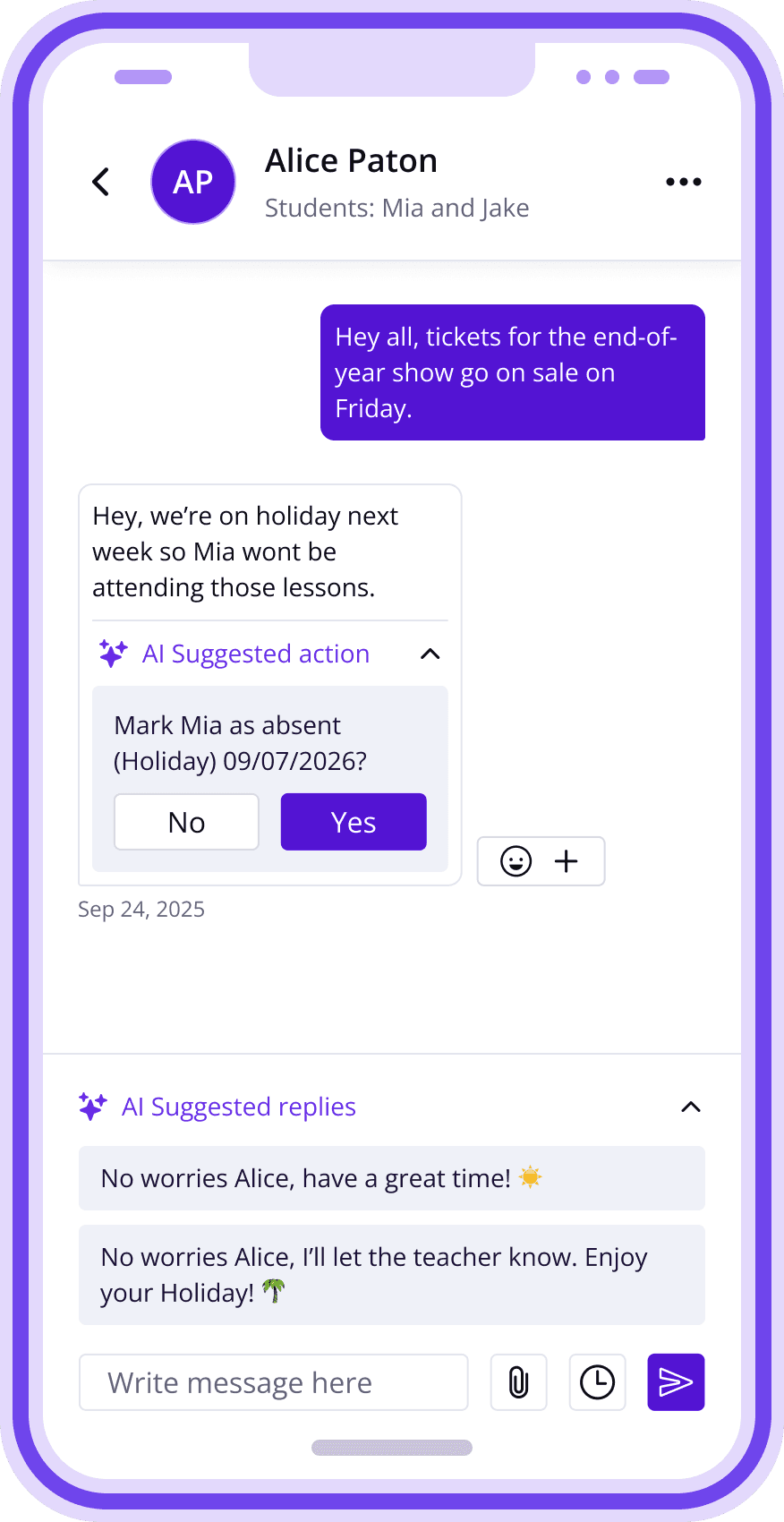
Our biggest feature, and the one we're proudest of, is Chats. Send 1:1 messages, broadcasts, or group chats, all without leaving Class Manager. Keep families updated on what's happening in each lesson, and use Spotlight to share the latest news and updates.
Here's the best part: with Class Manager Chats, built-in AI reads incoming messages and suggests replies and actions for you. If a parent messages to say their child is unwell and missing the next lesson, the AI picks up on it and marks the child absent from the right classes automatically.
For studio-wide updates, Spotlight works like an in-app social feed, perfect for announcements and alerts.
Every Chat and Spotlight post notifies families automatically, so nothing gets missed. Find out more about chats and Spotlight in our blog posts:
Safeguarding
When everything lives in one place, safeguarding stops being an extra task on your to-do list and becomes part of how your business naturally runs- no separate systems to manage, no gaps for things to slip through.
Class Manager lets you store and update waivers and custom registration forms in one place, with a clear record of exactly who's signed and who hasn't. No more chasing paper forms or digging through email threads to check if a parent has actually agreed to your terms.
Keeping all communication inside Chats means you're never handing out your personal phone number to parents, and it stops your teachers from doing the same. That matters for two reasons. First, it protects your staff and your families by keeping every conversation on record, in one searchable place, rather than scattered across personal WhatsApp threads that disappear the moment someone deletes an app or leaves the business. Second, it protects you as a business owner: when teachers communicate with families through personal numbers, there's a real risk of them building relationships outside the studio and taking students with them if they ever leave. Keeping communication inside the platform closes that door.
All of this information, waivers, forms, and message history, is stored securely on Class Manager, giving you a proper audit trail if you ever need one.
For studios working with children and young people, this isn't just a nice-to-have. Clear records, secure storage, and controlled communication are exactly what safeguarding policies expect from you as a business owner, and having it built into the software you already use every day means you're covered without any extra admin.
There’s So Much More To Class Manager
Class Manager has plenty more to offer that makes it the ideal software for a start-up dance studio.
Reporting: Know exactly who's attending classes and who isn't, so you can spot trends before they turn into lost students.
Skill tracking: Keep on top of how each student is progressing, level by level.
Family portal: Families can view their schedule, book classes, and message you, all without leaving the app.
And that's just scratching the surface. We'd love to show you around and see how Class Manager can help take your business from start-up to thriving.
Want to see how it works? Book a demo with our team, or create your free account and start setting up your Autumn term today.
Learn more about how Class Manager can help you here:
How to Encourage September Enrolments for Your Class-Based Business
Football Registration Software: How to Streamline Signups, Payments, and Data for Your Club
7 Payment Friction Points Killing Class Studio Revenue (And How To Fix Them Fast)
Why Class Manager Is The Best Class Management Software For New Class-based Businesses?
Why Class Manager Is the Best Option for Your Management Software?
Automated Emails for Trials, Enrolments & More: Let Class Manager Do the Chasing
Reporting Software for Dance Studios: How to Turn Class Manager Data into Smart Decisions
The Benefits Of Utilising Automated Trial Emails for Studio Owners
The Benefits of Skill Tracking Inside Your Studio Management Software
Prepare Your Class-Based Business for a Successful Start in September

